
How to Backtest on TradingView (Free Methods + Limits)

Sofia IvanovaHead of Customer Success
Key takeaways
- TradingView gives you two backtesting methods: Bar Replay for manual testing and the Pine Script Strategy Tester for automated testing.
- Use Bar Replay when your strategy needs visual or discretionary decisions; hide the future and step forward one bar at a time.
- Use Strategy Tester when your entry and exit rules can be coded objectively — then check drawdown and the trade list, not just net profit.
- TradingView's replay depth and features have subscription-dependent limits, and replay results aren't saved as a persistent journal.
- If manual logging becomes the bottleneck, Traders Casa combines bar replay on TradingView-powered charts with auto-logged trades and analytics, free.
If you want to know how to backtest on TradingView, you have two main options:
- Bar Replay for manual backtesting.
- Pine Script Strategy Tester for automated backtesting.
Bar Replay is the better choice if your strategy involves discretion: market structure, price action, zones, confirmations or anything else that needs you to actually look at a chart and make a decision.
Strategy Tester is better when your rules can be expressed precisely in code.
Both let you test an idea against historical price action without risking money. But they solve different problems, and neither removes the need for a properly defined trading strategy.
"Buy when it looks strong" is not a strategy. You need rules you can apply consistently enough that the 50th test means roughly the same thing as the first.
The 2 ways to backtest on TradingView
1. Bar Replay: manual backtesting
Bar Replay lets you move a chart back to an earlier point in history, hide what happened afterwards and reveal new candles progressively. You analyse each new bar as though it were happening live.
That makes it useful for discretionary strategies where you need to ask questions such as:
- Has price swept the previous high?
- Is this actually a valid support zone?
- Does this setup meet every entry condition?
- Would I have taken this trade without knowing what happens next?
TradingView lets you move forwards manually or play the historical market automatically at different speeds.
2. Pine Script Strategy Tester: automated backtesting
If your strategy has objective rules that can be coded, TradingView's Pine Script strategies can simulate those rules over historical data and generate a strategy report.
Instead of manually clicking through hundreds of candles, the script handles the entries and exits. You then inspect metrics such as net P&L, maximum drawdown and the individual trades generated by the strategy.
The trade-off is simple. Manual replay gives you flexibility but costs time. Automated testing gives you speed, but your rules need to be specific enough to code.
Method 1: Bar Replay, step by step
For most traders learning how to backtest on TradingView, Bar Replay is the easiest place to start. You don't need to write code. You do need a written strategy and enough discipline not to quietly change it whenever a trade looks inconvenient.
1. Open your chart
Open the market and timeframe you want to test. For example, if you're testing a forex setup on EUR/USD using the 15-minute chart, load that chart with the indicators and drawings your strategy genuinely requires.
Keep the setup close to what you'd use when trading normally. Don't add six extra indicators halfway through because trade number nine hurt your feelings.
2. Activate Bar Replay
Click the Replay button in the chart's top panel. TradingView opens the replay controls and allows you to select where you want the historical simulation to begin.
If Bar Replay isn't available on your current chart, check the chart type — some non-standard chart types and configurations don't support replay.
3. Pick a start date
Choose a historical date before the period you want to test. Ideally, don't deliberately choose a period because you already know what happened.
If you remember that GBP/USD collapsed on a particular Wednesday and conveniently begin testing your short strategy on Tuesday evening, you're not exactly conducting a blind experiment. Pick periods without cherry-picking the outcome.
4. Hide the future
This is the important bit. Once you select your starting point, future price action is removed from view. That's what makes replay useful.
You're no longer looking backwards at a completed chart thinking: "Obviously I'd have bought there." Of course you would. The next 40 candles are already sitting on your screen.
A proper manual backtest forces you to make decisions using only information that would have been available at that moment.
5. Step forward bar by bar
Use the forward control to reveal the next candle manually. You can also use autoplay, but stepping forwards one bar at a time is often better when you're testing entries that require precise confirmation.
Treat each new candle as new information. Don't mentally peek ahead. Don't drag the chart around looking for clues. And don't reinterpret your rules because the setup suddenly looks ugly. Ugly setups count too.
6. Take setups according to your rules
When a valid setup appears, record the trade exactly as your strategy specifies. That means having rules for things such as:
- Entry conditions
- Stop-loss placement
- Profit target or exit condition
- Risk per trade
- Session or trading hours
- Markets and timeframes
- Conditions that invalidate the setup
TradingView also has historical Replay Trading functionality, allowing simulated orders during the replay session — these replay results are separate from normal Paper Trading.
Whatever method you use, consistency matters more than finding the "perfect" historical entry. If your stop goes below the swing low on trade one, it shouldn't mysteriously become a volatility-adjusted stop on trade 14 because that one would otherwise lose.
7. Log the results
This is where basic TradingView backtesting becomes more awkward. You need a record of what happened. At minimum, log:
- Date and time
- Market
- Direction
- Entry
- Stop loss
- Exit
- Result
- Setup or strategy
- Notes on why the trade qualified
Screenshots can also help when reviewing discretionary setups.
TradingView's historical Replay Trading can show trades and an overall result during the session, but that data is available only in that session and isn't saved afterwards. So if you want a lasting backtest database, you'll need another way to record it.
Also remember that replay access depends on the symbol, timeframe and TradingView subscription. Intraday historical depth is restricted by plan, so don't assume every market can be replayed indefinitely on every timeframe.
Method 2: Pine Script Strategy Tester
Manual backtesting makes sense when you are part of the strategy. If the rules are completely objective, repeatedly clicking through candles isn't always the best use of your afternoon.
That's where Pine Script strategies come in. Pine Script is TradingView's programming language. A strategy script can define entry and exit conditions and simulate those rules against historical price data.
You have two routes:
- Write your own strategy in Pine Script.
- Add a published strategy that's already available to you.
The second option is easier, but make sure you understand the strategy's actual rules before treating its report as meaningful. A colourful equity curve isn't due diligence.
Once a strategy is applied, TradingView generates a strategy report with several sections covering performance, trade analysis and individual simulated trades.
Net profit
Net profit tells you the cumulative realised profit or loss generated by closed trades over the selected test period. Useful? Yes. Enough on its own? No.
A strategy that makes money while taking enormous drawdowns may be completely unsuitable for how you intend to trade it.
Maximum drawdown
Maximum drawdown helps you understand how badly the strategy's equity declined during the test. It's one of the first numbers to check alongside profitability because it gives the headline return some risk context.
Don't just ask, "Did it make money?" Ask, "What did I have to sit through to make that money?" Very different question.
List of trades
The trade list lets you inspect the individual transactions behind the summary statistics: trade number, type, date and time, price, position size, net P&L, run-up, drawdown and cumulative P&L.
Use it. Summary statistics can hide behaviour you need to understand. The trade list lets you check whether the strategy is behaving the way you intended rather than merely producing a pleasing final number.
What TradingView won't do for you
TradingView is very good at showing you historical charts. The bigger problem starts after you take the trade.
For manual Bar Replay testing, you don't automatically get a permanent, structured trade journal that turns every replay decision into a long-term database. Replay Trading results are session-based and aren't saved after the session.
That leaves you manually recording trades in a spreadsheet or another journal if you want to analyse them later. And recording the final P&L isn't enough.
Once you've tested a decent sample, you'll probably want to answer questions like:
- Which session performs best?
- Which setup keeps losing?
- Does your strategy perform differently by market?
- Are a few large winners carrying mediocre results?
- Does performance deteriorate after several consecutive trades?
That's where manual logging becomes the boring half of manual backtesting.
There's also historical-data access to consider. TradingView's replay depth varies by timeframe, instrument and subscription, particularly for intraday data.
So TradingView backtesting works well when your main priority is testing directly on familiar charts. It becomes less convenient when you want replay, persistent trade logging and deeper analysis to happen as one workflow.
When you need more
If you've reached the point where the spreadsheet is taking almost as much effort as the backtest, you have another option.
Traders Casa runs bar replay on TradingView-powered charts, but combines the chart with the trade-recording side of the process. You can replay historical price action, take trades according to your strategy and have those trades logged rather than manually copying every result into a spreadsheet.
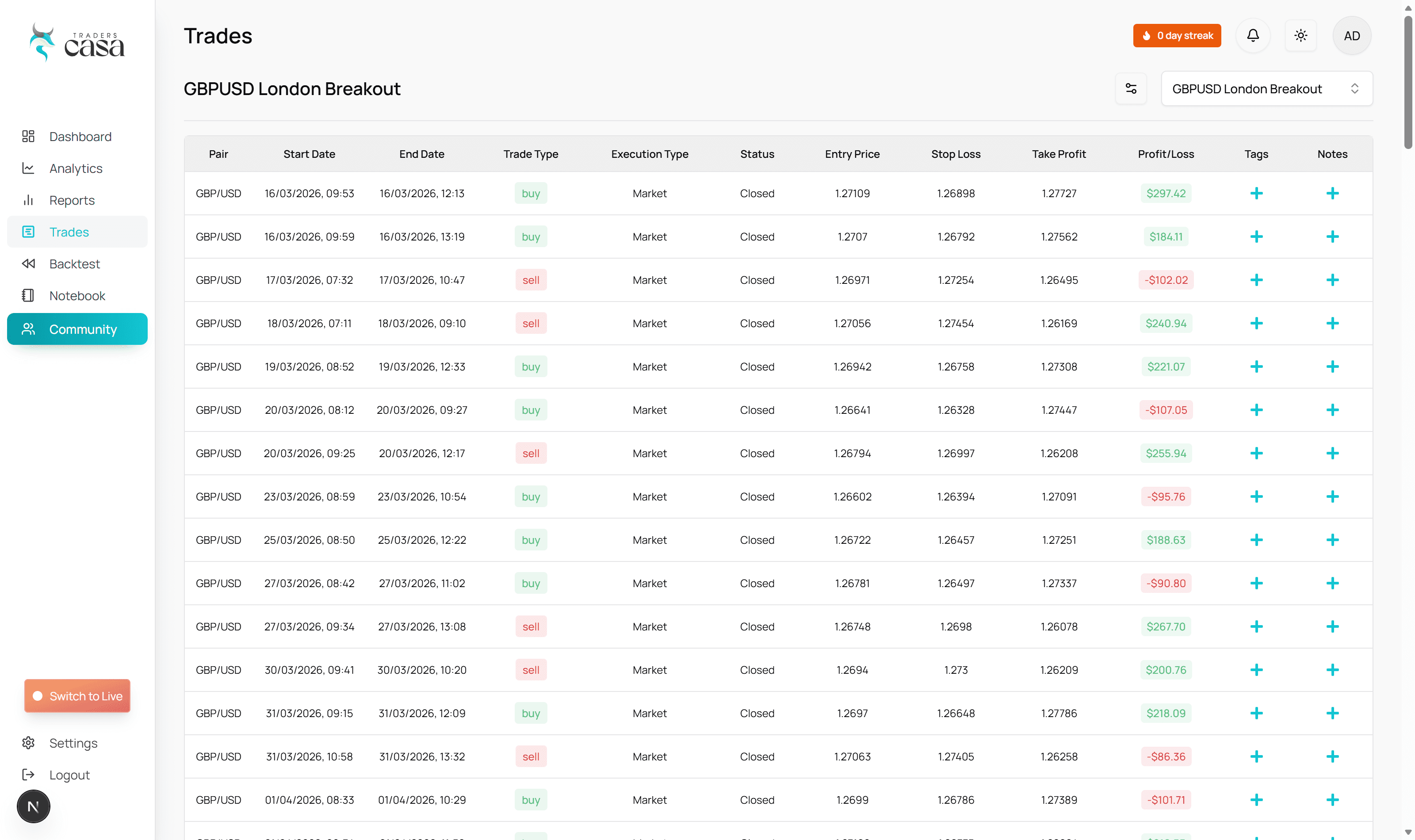
The free plan is free forever and includes:
- Unlimited backtest sessions
- Six months of historical data
- One-minute data
- P&L graph
- Consistency tracker
- No card required
Basic extends the historical data to six years. Pro provides 20+ years of data, plus live trade journalling, broker sync and 300+ analytics.
Traders Casa is not a broker and doesn't provide trading signals. It's a backtesting and journalling tool, used by 750,000+ traders with more than 15,000,000 trades backtested on the platform.
The point isn't that you have to leave TradingView. If Bar Replay plus your existing logging setup does everything you need, keep using it.
But if you're spending too much time transferring replay trades into spreadsheets and then building your own analytics afterwards, combining those jobs makes considerably more sense. Not sure which tool fits? See our free backtesting software comparison.
FAQ
Is TradingView backtesting free?
TradingView has a free plan, but features and historical-data access vary by subscription, and Bar Replay access has plan-dependent restrictions. If you're testing on the free tier, check what replay functionality and history are currently available for your chosen market and timeframe.
Is bar replay accurate?
Bar Replay uses historical market data to reconstruct past price movement, making it useful for testing how your rules would have behaved. But a replay backtest is still a simulation: execution assumptions, your own decision-making and available historical data all affect how closely the test represents real trading.
Can TradingView backtest automatically?
Yes. TradingView's Pine Script strategies can automatically simulate coded entry and exit rules against historical data and produce a strategy report. If your strategy can't be expressed as objective rules, manual Bar Replay is usually the more appropriate method.
Quick Recap
- TradingView gives you two main backtesting methods: Bar Replay for manual testing and Pine Script Strategy Tester for automated testing.
- Use Bar Replay when your strategy requires visual or discretionary decisions.
- Hide future price action, move forwards one bar at a time and apply the same rules to every setup.
- Log every trade. A backtest you can't review later has limited value.
- Use Strategy Tester when your entry and exit rules can be coded objectively.
- Don't judge an automated strategy on net profit alone. Check drawdown and individual trades too.
- TradingView's replay functionality and historical depth have subscription and instrument-dependent limits.
- If manual logging becomes the bottleneck, Traders Casa combines bar replay on TradingView-powered charts with auto-logged trades, a P&L graph and analytics.
Worth knowing before you upgrade: placing simulated orders inside TradingView's Bar Replay requires Premium, and intraday replay needs Essential or above. We've laid out what each tier actually unlocks in our TradingView Bar Replay alternative comparison.
Keep the TradingView charts, lose the spreadsheet: bar replay with auto-logged trades, a P&L graph and a consistency tracker — free forever.
Start backtesting free