
Custom indicators
Custom indicators built for your backtesting setup
Traders Casa indicators are built in house to run directly on the TradingView powered backtest charts. You get the ICT, SMC and technical tools your strategy depends on inside the replay itself, with indicators saved as part of your chart layout. If something you need is missing, you can request it for the suite.
- Indicators in the suite today
- 27Indicators in the suite today
- Built by Traders Casa, not scraped from a library
- In houseBuilt by Traders Casa, not scraped from a library
- Indicators persist with your chart layout
- SavedIndicators persist with your chart layout
- Missing tools can be added to the roadmap
- RequestableMissing tools can be added to the roadmap
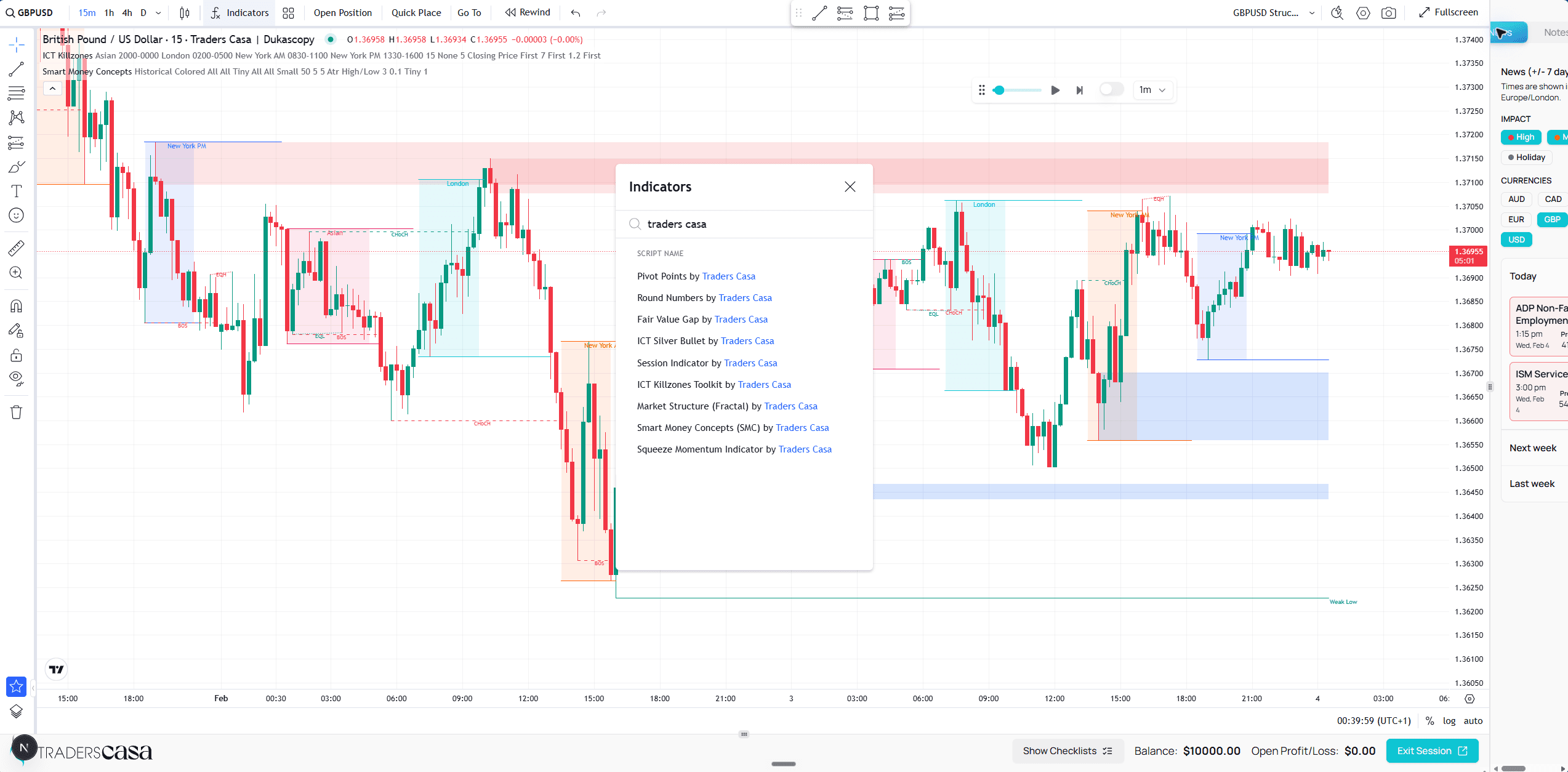
What is in the indicator suite
Tools for ICT and smart money concepts, plus the conventional technicals.
The suite covers the tools commonly needed to test ICT and smart money concepts setups, alongside broader technical indicators.
Imbalance and structure
Fair Value Gap, Smart Money Concepts (SMC) and Market Structure (Fractal).
Time based ICT
ICT Killzones and ICT Silver Bullet, so the timing component stays visible while you replay.
Higher timeframe and PDA
HTF PO3, plus Time Based PDA in HTF, Lookback and Smart variants.
Cycles and levels
Dynamic P & D, Semi / Quarterly Cycles, Sessions, Pivot Points and Round Numbers.
Conventional technicals
Squeeze Momentum and Simple Moving Averages for the more familiar studies.
Growing on request
The list expands as traders ask for tools their own strategies depend on.
| Indicator | What it draws |
|---|---|
| Fair Value Gap | Bullish and bearish FVG boxes that clear on mitigation, with optional mitigation and unmitigated level lines. |
| Smart Money Concepts (SMC) | Swing and internal market structure with BOS and CHoCH, plus order blocks. |
| Market Structure (Fractal) | Fractal swing detection with CHoCH and BOS structure breaks. |
| ICT Killzones | Killzone boxes with top, bottom and mean lines, extended past the zone. |
| ICT Silver Bullet | The three New York silver bullet windows: 3 to 4am London, 10 to 11am and 2 to 3pm. |
| HTF PO3 | A higher timeframe candle projected to the right of the last bar. |
| Time Based PDA (HTF) | Higher timeframe PDA variant, colouring bars by their trading day. |
| Time Based PDA Lookback | A lookback study that highlights every bar matching the PDA condition. |
| Time Based PDA Smart | The smart edition lookback study, colouring qualifying bars. |
| Dynamic P & D | True open levels for the day, session, week, month and 90 minute cycle. |
| Semi / Quarterly Cycles | A separate pane cycle ruler with eight stacked lanes. |
| Sessions | Tokyo, London and New York session shading, with configurable times. |
| Pivot Points | Classic pivot levels, P plus R1 to R5 and S1 to S5, from the previous period. |
| Round Numbers | Horizontal levels above and below the current close at a fixed step. |
| Squeeze Momentum | A squeeze momentum oscillator in its own pane. |
| Simple Moving Averages | Simple moving averages, with close at or above the average signalled. |
Inside the app each of these appears in the indicator list prefixed with Traders Casa, so searching that name brings up the whole suite in one place.
The point is not the size of the library. Free indicator libraries already contain thousands of scripts. The difference is that these are built and maintained by Traders Casa for the backtesting environment where you actually need them.
Why indicators inside the replay matter
An indicator on your live chart is useless if the replay cannot run it.
That creates a basic problem for ICT and SMC traders. You might have a strategy that requires a Fair Value Gap, a particular session, Market Structure (Fractal) and ICT Killzones. Remove one of those inputs from the replay and you are no longer testing the setup as you trade it.
Traders Casa puts its indicator suite on the TradingView powered backtest charts themselves. You can replay historical price with the relevant tools on the same chart, rather than replacing part of your strategy with a rough visual estimate because the backtesting software does not support the indicator you normally use.
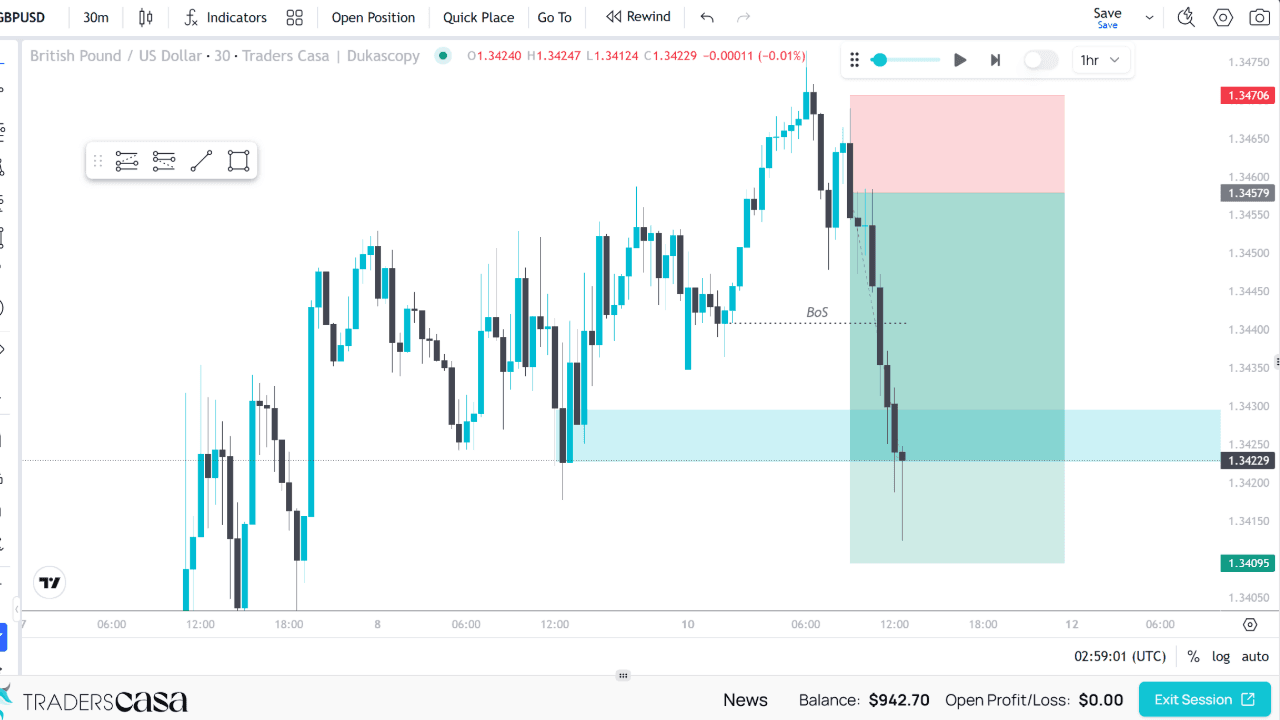
This also avoids relying on a collection of unrelated community scripts when you move from charting to backtesting. That distinction matters more than another long list of indicators. The useful indicator is the one you can actually have on the chart while testing the rules that depend on it.
Your setup stays there between sessions
Building the right chart once is useful. Rebuilding it every time is not.
Indicators in Traders Casa are saved with your chart layout. When you configure the layout you use for backtesting, that indicator setup persists between sessions.
That matters when your setup uses several tools at once. You might combine Sessions with Fair Value Gap and Market Structure (Fractal), or use ICT Killzones alongside Time Based PDA and HTF PO3. You should not have to reconstruct that combination whenever you start another session.
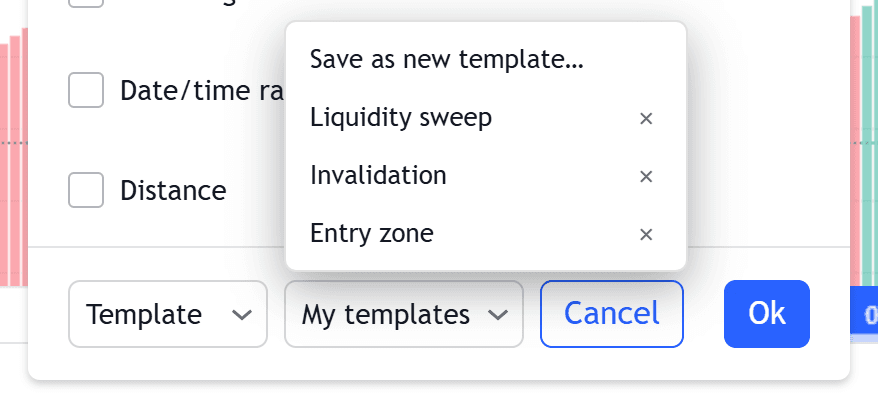
It removes a small but repetitive piece of work from the backtesting process and, more importantly, helps you return to the same chart configuration rather than unintentionally changing the tools between sessions. You spend the next session testing the strategy, not rebuilding the workspace first.
Request the indicator your strategy needs
No fixed library covers every setup, so the list is not fixed.
If your strategy depends on an indicator that is not currently in the suite, you can request it. Feature requests feed into the roadmap rather than leaving the indicator library as a static collection.
Requests are prioritised according to plan. Pro requests receive the highest priority and can ship in as little as three days.
To be clear
That does not mean every requested indicator arrives within three days. It means a Pro request can move from request to release that quickly when it can be prioritised and built on that timetable.
Custom indicators are available on the Basic and Pro plans. They are not included on the Free plan, though you can still start with a free account to see how the backtesting workflow fits you before choosing a plan.
For a trader whose strategy depends on specific chart tools, this changes the question from "does this replay platform happen to support my setup?" to "can the missing tool be added?"
Who it is for
The custom indicator suite is for retail forex traders whose backtesting rules depend on specific ICT, SMC or technical chart tools.
It is particularly relevant if you already use Fair Value Gap, ICT Killzones, ICT Silver Bullet, HTF PO3, Time Based PDA or Smart Money Concepts (SMC), but find that the indicators available on your normal charts disappear when you move into a separate replay tool. It is also useful if you want one repeatable chart layout rather than rebuilding a collection of scripts before each session.
Custom indicators FAQs
Which indicators are included?
The current suite includes Fair Value Gap, Smart Money Concepts (SMC), Market Structure (Fractal), ICT Killzones, ICT Silver Bullet, HTF PO3, Time Based PDA in HTF, Lookback and Smart variants, Dynamic P & D, Semi / Quarterly Cycles, Sessions, Pivot Points, Round Numbers, Squeeze Momentum and Simple Moving Averages. The suite can expand as new indicators are requested and built.
Can I request a new indicator?
Yes. If an indicator your strategy depends on is missing, you can submit a feature request. Requests are prioritised by plan, with Pro requests receiving the highest priority. A Pro request can ship in as little as three days, although that is not a guaranteed delivery time for every request. Custom indicators are available on Basic and Pro.
Do the indicators work while backtesting?
Yes. Traders Casa builds its indicators to run on its TradingView powered backtest charts, so you can use them while replaying historical price. That is the main distinction from collecting scripts that are available on another chart but unavailable inside your replay tool. You can test the strategy with the chart tools its rules actually require.
Will I need to add my indicators again next session?
No. Your indicators are saved with your chart layout, so the setup persists between sessions. Once you have configured the layout for the strategy you are testing, you can return to it without rebuilding the indicator stack each time. That is particularly useful for setups combining several time, structure and level based indicators.
Are custom indicators available on the Free plan?
No. Custom indicators are available on the Basic and Pro plans. You can start with a free Traders Casa account, but you will need Basic or Pro to use the custom indicator suite. Pro also receives higher priority for feature requests, with requested indicators able to ship in as little as three days in some cases.
More features
All features

Start on the free plan
Unlimited backtest sessions on TradingView powered charts, and the free plan never expires. Upgrade when you need the rest.